2013年4月8日 星期一

Microsoft Security Essential

由Microsoft推出的免費防病毒軟件!Microsoft Security Essential
官方網站連結 : http://windows.microsoft.com/zh-hk/windows/security-essentials-download

支援視窗 :
 - Windows 7
 - Windows Vista
 - Windows XP (32bit only)

以下版本Windows不支援 :
 - Windows 9x / ME / 2000
 - Windows XP (64bit)
 - Windows 8
 - 任何 Server 版本

下載連結
 - Download for Windows XP
 - Download for Windows 7 / Vista (32 bit)
 - Download for Windows 7 / Vista (64 bit)

我的Windows 7 / Vista 是 32bit還是64bit?
- 開啟 [系統],請按一下 [開始] 按鈕 、以滑鼠右鍵按一下 [電腦],然後按一下 [內容]。
- 或參考以下連結

安裝時需注意 :
1. 每個電腦只能安裝一個防病毒軟件,任何時候安裝防病毒軟件都必需先確定你的電腦沒有其他防病毒軟件,如已經有其他防病毒軟件請先Uninstall才好安裝,電腦多過一個防病毒軟件的話,輕則嚴重影響電腦效能及速度,重則無法啟動電腦或登入後電腦沒有反應。
2. Security Essential需要正版視窗才可以安裝,當然Crack左都可以安裝!

2013年4月4日 星期四

[ winmail.dat or no attachment ] Outlook 2007 / 2010 Send Out E-Mail Problem

Cause :
- When you use Microsoft Office Outlook 2010 or Microsoft Office Outlook 2007 to send an email message, the recipient of the message sees an attachment that is called Winmail.dat. This article helps you fix the problem.

- Forward E-Mail without any attachment, but recipient see the mail have much empty line and included "winmail.dat" attachment.

Resolution :
Download and Run Microsoft Fix it 50041

Source :
From Microsoft  http://support.microsoft.com/kb/958012

Tailor Make D-Sub 15pin VGA Head for Projector / LCD / TV

下圖是 MiTECH 的 15pin VGA Moduler 價格已忘記, 約$38元,請參考下圖底部已有我慣常使用的接駁方法!

線材我會購買MiTECH VGA Cable (3C+8Pin) 價錢十分昂貴約 $1400元100碼
 - 3C+8P 代表Coxial Cable x3 再加 8芯線!
 - 測試過20﹣30米內是一定沒有任何問題!

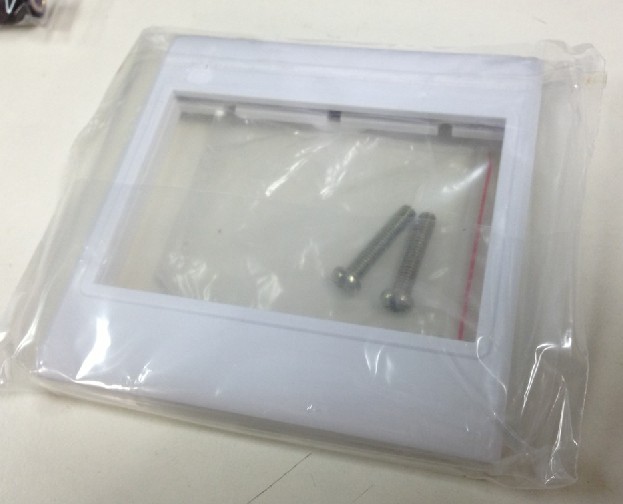
下圖是在騰達電腦購買的15pin VGA Moduler, 本身設計用於下圖Face Plate, 可裝三個Moduler, 但我一般都是把白膠拆走裝在Steel Plate上比較硬淨!


Remark :
MiTECH 15pin VGA Moduler 及 騰達的15pin VGA Moduler怎樣選擇?   MiTECH的質感比騰達好很多,但外於MiTECH Moduler體型較大,安裝於Steel Plate後, 底部沒有任何底箱夠深,CK箱及斜箱都頂住左,如要安裝在底箱內就必需選擇騰達的Moduler


以下是騰達電腦提供給客戶的接線圖

下圖是15pin 的VGA Module


紫圖是8pin VGA Module的接線圖,我沒有測試過長度,相信15﹣20尺內是沒有問題的,店員說8pin不能輸出40inch Wide Screen。


其他接駁


RJ45 Jack Moduler (由於只有8pin及沒有Ground, 10尺以後影像質素開始下降,特別注意是會出現鬼影。

2013年4月3日 星期三

Open Network File Slowly / No Responding / Hang ( Excel )


Problem Product : Office 2003 / Excel 2003

When you access the excel file on server/network drive, it may slow, not responding or hang, it only happen on server/network drive because you apply update of Excel 2003 Office File Validation (OFV), You can try to copy the file to your local computer / desktop for ensure is network problem.

Source from Microsoft :
http://support.microsoft.com/kb/833041

Solution:
You can download Microsoft Fix it 50637, it will disable OFV on Excel 2003
http://go.microsoft.com/?linkid=9767060

2013年4月2日 星期二

Puzzle & Dragon 首次課金 iTunes 需知!

前提 :
安裝PAD需要使用日本 iTunes帳號才可以安裝!而課金的帳戶必需擁有PAD才可以在GAME內購買,這表示你必需擁有一個已購買PAD Game及可輸入有效信用咭的iTunes帳號!

1. 建立日本帳號而無需輸入日本信用咭資料!
 - 開啟 iTunes, 注意必需登出, 在iTunes Store的最右下角點選 "國別" 的圖案

 - 選擇日本

- Search PAD, 找到Puzzle & Dragon,Click "Free"

- 登入時, 選擇 "Create Apple ID"

- 這樣便會出現可選擇 <none> 信用咭建立帳戶
 

2. 購買免費的Puzzle & Dragon
 - 完成購買Puzzle & Dragon

3. 更改 iTunes帳號的Country從日本到香港

4. 輸入信用咭資料

5. 解封 iTunes帳號
 - 首次購買石時iTunes帳號必會被 Apple封鎖,坊間傳聞因購買金額較大為保障而被封了,我見過有朋友買3石亦被封,相信是Apple針對此遊戲保護玩家帳號吧了,封鎖只會是首是被封,解封後不會再出現被封的情況!

請到以下網址 :
https://expresslane.apple.com/Issues.action

按 Continue後,選擇 E-Mail, Email內註明你的 Apple iTunes ID無法使用 Puzzle & Dragon內的內建購買功能,兩個工作天內便會被解封


注意 :
 ﹣ 不要以為信用咭才會被封鎖,只要是新 iTunes帳號及帳號從未有信用咭購買的紀錄均會被封鎖,即是 iTunes Gift Card包括日本的Gift Card均會被封!
 ﹣日本 iTunes帳號只能使用Japan Credit Card 及 Gift Card, 香港 iTunes帳號只能使用 HK Credit Card及Gift Card
 ﹣ 只要你的 iTunes帳號可以轉國別便無需建立新的iTunes帳戶,小弟因購買了iTunes Match便無法更改國別需建立另一個iTunes帳號
 ﹣ 帳戶被封鎖, 一般需要2個工作天才可解封,需要注意是工作天!所以需要課金彩石抽蛋請於一星期前準備及購買, 如今天是星期四, 星期六日神up, 基本上你趕唔切解封, 好大機會星期一才會被解封帳號!

OS X How to Automatically Map Network Drive

本提目我們分為兩部份 :
 ﹣ 如何連接到Network Drive  (Step 1 to 5)
 ﹣ 登入後如何自動連接Network Drive (Step 6 to 9)


1. Finder  >  Go >  Connect to Server 

2. 輸入 Server Address
 e.g. : smb://192.168.2.3    or    afp://192.168.2.3   (如Windows Server請使用smb)


3. 連結Share Folder時需輸入使用者名稱及密碼,注意勾選Add to Keychain的話,下次進入便不會再詢問密碼

4. 選擇連接到 Server 的那一個 Share Folder


5. 連接後 Desktop 會出現 Share Folder 的 Drive


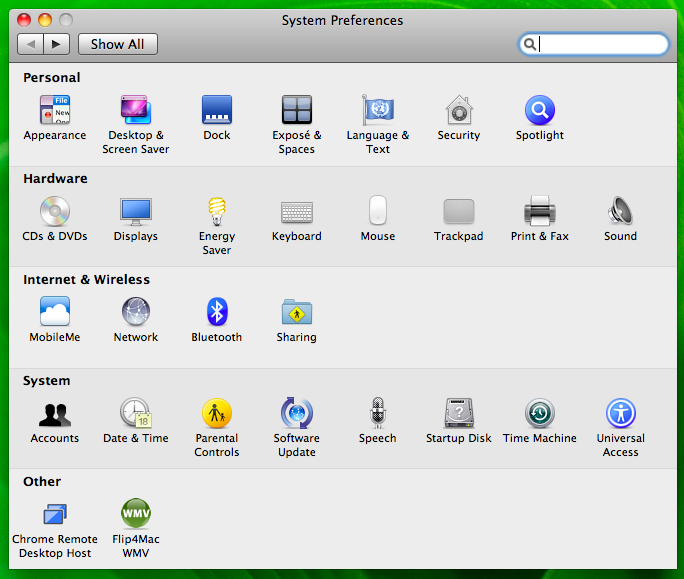
6. Apple > System Preferences


7. Accounts


8. Left Panel "My Account" 選擇登入的帳戶, Right Side 選擇 "Login Items" Tag
 - 選擇後會看見這個User登入後會自動執行的項目

9. 把Desktop 的 Network Drive拉進登入項目便可

AVASoft Professional Antivirus


又一個新的 Fake Anti-Virus, 出現上圖後,防病毒軟件, Registry, CMD等功能均被停用,亦不能不理會它, 因為基本上所有程式包括Word & Excel均不能使用!

這台電腦使用Symantec EndPoint Protection居然沒有被偵察出來,還給它關掉了服務!幸好這個病毒比較容易對付!

Infected PC Symantec EndPoint Def. Date : 2-Apr-2013
Infected Date : 2-Apr-2013
Infected PC OS : Windows 7 64bit
Virus Report on Internet : 21-Mar-2013

Solution :
1. Boot Safe Mode
2. Delete 病毒檔  C:\ProgramData\<數字頭的資料夾>  唔肯定的話, 請rename 


3. Boot Normal Mode
4. 下載 Malwarebyte 及掃瞄 http://www.malwarebytes.org/


Remark : 暫時發現這病毒只影響謀個Login Profile,不影響Registry, 不清楚載入點, 只刪除病毒檔便可!