顯示具有 Microsoft Office 標籤的文章。 顯示所有文章

2017年7月7日 星期五

Office Product Key and Download

First Purchase activate the Office
How to check my installed office product key
How to change my office product key
Where can i download Office 2007/2010 for install my Office product.


First Purchase activate the Office


If you purchase Office 2013 and Office 2016, you should create a MS Office Account to hold your Office product key, Your box of product inside only have a key card, the physical key card is used for redeem the installation key, after redeem the installation Key the key card is no value rubbish.

I will suggest after redeem the installation key, you should write down the register Office Account e-mail and product installation key on this physical key card to identify you own this product.

Now starting to activate your office, please click the following link:
Http://www.office.com/setup <Only for Office 2013 and 2016

If you redeem more than one office product on your account, the page only Added Date to identify each office, so if you redeem 10 pcs as same time, you will hard to identify which one is new entry, because it will not sort by entry order , Each office account only hold 30 office product.

If you purchase the Office 2013/2016 in Hong Kong, once you redeem the product you have 3 language for choose, "Chinese Tradition", "Chinese PRC" and "English", even your physical product is english, you also choose Chinese language, but remind your redeem only have times to select the language you can not change later, but the installation key did not limit the language, your install key can use and install any language office, just your download page only your selected Language for download.


How to check my installed office product key

Open the "Command Prompt"

For 32-bit Office 2016
cscript "C:\Program Files (x86)\Microsoft Office\Office16\OSPP.VBS" /dstatus
For 64-bit Office 2016
cscript "C:\Program Files\Microsoft Office\Office16\OSPP.VBS" /dstatus
For 32-bit Office 2013
cscript "C:\Program Files (x86)\Microsoft Office\Office15\OSPP.VBS" /dstatus
For 64-bit Office 2013
cscript "C:\Program Files\Microsoft Office\Office15\OSPP.VBS" /dstatus
You will get last 5 characters of installed producy key

Login your Office Account and compare the key
http://www.office.com/myaccount


How to change my office product key


Open the "Command Prompt"

For 32-bit Office 2013
cscript "C:\Program Files (x86)\Microsoft Office\Office15\OSPP.VBS" /inpkey:yourkeygoeshere
For 64-bit Office 2013
cscript "C:\Program Files\Microsoft Office\Office15\OSPP.VBS" /inpkey:yourkeygoeshere 
Remark : If your product is Office 2016, please change Office15 to Office15


Where can i download Office 2007/2010 for install my Office product.


For Office 2010 (English) - https://products.office.com/en-us/office-2010
For Office 2010 (Chinese) - https://products.office.com/zh-hk/office-2010
For Office 2007 (English) - https://products.office.com/en-us/download-office-2007
For Office 2007 (Chinese) - https://products.office.com/zh-hk/download-office-2007


2017年6月20日 星期二

the operating system is not presently configured to run this application windows / 作業系統目前未設定執行此應用程式

When you try open any Microsoft Office product and pop-up the following screen "the operating system is not presently configured to run this application windows"


Please check did you installed Symantec Anti-Virus, recently i have implement Symantec Endpoint Protection Cloud on my client office, after install some user report the following error message and can't open any Word/excel/outlook.


If your problem is cause by Symantec Endpoint Protection Cloud, please try open it and update the definitions, after update it will back to normal.


2015年3月6日 星期五

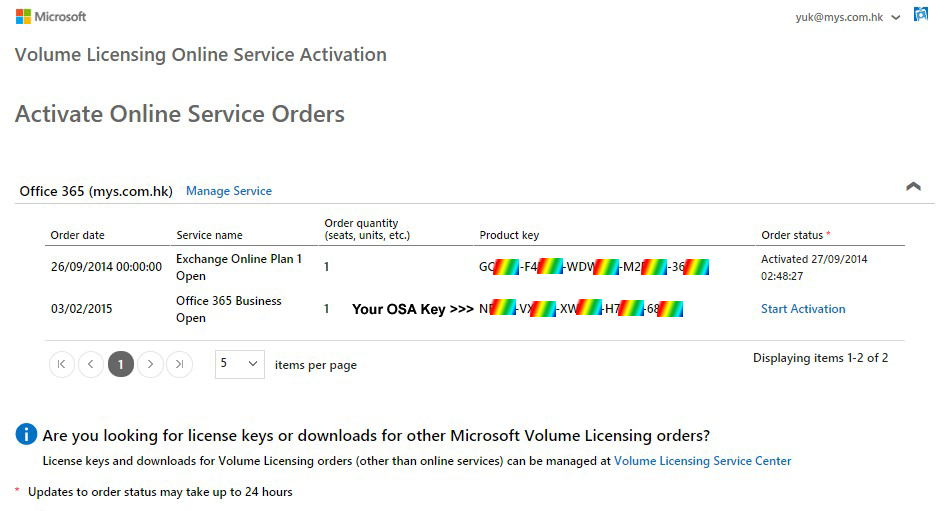
Where can i find my OSA key


1. Sign in your Volume Licensing Service Center, if you do not have the account, please sign up now.
https://www.microsoft.com/licensing/servicecenter/default.aspx

2. Please make sure you already add the license to your account, you can click Licenses > Relationship Summary > then click Add Open License to add the license


3. Click Online Service Activation, select the License ID and click Manage Activations 


4. click Sign-in with xxxxxxx.xxx << Your domain


5. You can find your OSA key and you can click "Start Activation" to activate your product, or try redeem instruction.


If you got any problem for Microsoft Volume Licensing, you can contact Microsoft Volume Licensing Support

2015年3月5日 星期四

How to Activate Your Office 365


1. Go to https://portal.office.com/commerce/productkeystart.aspx

2. Click the box that you are acknowledge and got permission to be the Office 365 administrator for the organization, then click on Start.
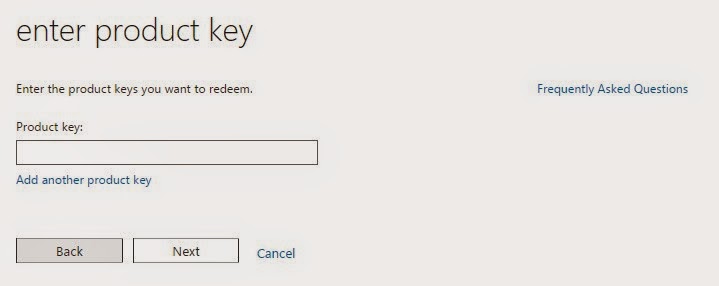
3. Enter the OSA key from the step one, then click on Next.

Where can i find my OSA key?


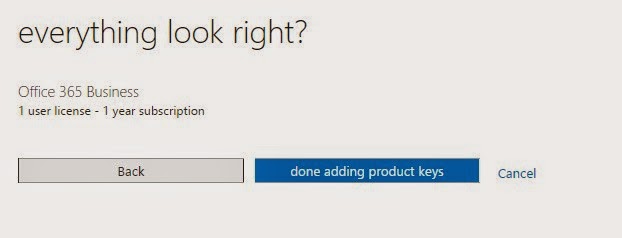
4. click done adding product keys


5.       click start step 2

6.       You can set up your new Office 365 account or click sign in to login existing account


2014年3月31日 星期一

無法啟動Microsoft Office Outlook 無法開啟Outlook視窗 無效的xml

適用於 : Outlook 2007 / 2013  <<暫時見到或試過這兩個版本會出現這個訊息

問題 : 無法開啟Outlook及出現以下訊息,參考網上文章,開新的Profile均不能解決這個問題, 而Office Word/Excel等其他功能則沒有問題


解決方法
1. 按開始 > 執行    或     "Windows Key + R"
2. 輸入 "Outlook /resetnavpane"
3. 開啟Outlook後以後一切正常


2013年11月18日 星期一

About Office and Update

Microsoft Office 365
Product Description
 - Office 365 產品分別有家用, 小企及企業版本,除了家用沒有企業用電郵外其他版本均有企業版電郵功能(即e-Mail Hosting), 其e-Mail Host使用Exchange Server,可以使用Outlook的Exchange功能,Office 365主要是以年費形式支付可用比較平的價錢供多台電腦安裝最新版本的Office 2013及雲端功能,以上三個版本均為零售版本,你可與零售商查詢其他Office 365 package,如商業客戶可能已雍有及早前已購買了不同版本的Office,只想使用Office 365的Exchange Server企業電郵,請向Microsoft分銷商查詢現有的Office 365 package。

Why using Office 365?
 - 先要從兩點分柝,電郵 及 Office,致於以價錢方向來探討的話則沒有這個需要,因為每間公司對軟件,功能及支援的看法均不相同,有些客戶只看錢而背後的Cost完全不看,那沒有什麼好探討。
 - 電郵功能 : Office 365的收費是以每一郵箱計算,每個郵箱有25GB儲存空間,有些Package更提供無限Archive的儲存空間,除Exchange Mode外亦有提供Pop3 Mode,在使用Exchange模式時,你的郵件在雲端Exchange Server及本地電腦上的Outlook是同步的,即使電腦壞了或更換電腦也不用做任何備份及害怕失去任何電郵,Exchange Server的最大好處是雲端功能,Webmail上的郵件及資料夾層次與你本地電腦的Outlook是一樣的, 如你經常需要出差及在不同地方check e-mail工作及大量保存郵件,Office 365一定是最適合你使用的。Exchange Server這個名字相信很多人聽過,很多公司會自行架構Exchange Server同樣是因為功能及管理上比較適合,Exchange Server 與 Office 365的Exchange該如何選擇呢,那個比較化算?在今天買一台Exchange Server, Hardware連Software License最少需要二萬元,還未計算備份裝置, Anti-Virus / Spam及支援費用,可能需花3-4萬元,以每年支援費用一萬元計算,這台Exchange Server三年則需要花約 6萬,3年後Hardware需廷長保養,Exchange版本可能又不同了, 3年後會否就是這台Exchange Server的Life Cycle嗎?要再更換或升級嗎?Office 365在企業來講,比較容易計算每年需花的支出, Microsoft 在資料保存及防止Server被Hack及中毒等相信一定比自家的IT同事出色一點吧!
 - Office功能 : <updating>

Tools
 - Microsoft Online Services Sign-In Assistant for IT Professionals RTW <Version 2.1, 18-Jun-2012>

Microsoft Office 2013
< Update Later >
Services Pack
 - No Services Pack Available <Last Update 19-Nov-2013>

Microsoft Office 2010
< Update Later >
Services Pack
 - Service Pack 2 for Microsoft Office 2010 (KB2687455) 32-Bit Edition <22-Jul-2013>
 - Service Pack 2 for Microsoft Office 2010 (KB2687455) 64-Bit Edition <21-Jul-2013>
HotFix
 - Get error message when you click a hyperlink in outlook mail.
    <Microsoft Fix it 20056 for Windows 8>

    <Microsoft Fix it 50388 for Windows 7, Vista, XP>
 - Send e-mail but other side does not receive any attachment or receive winmail.dat attachment
    <Other Blog>
   <Microsoft Fix it 50041>

Microsoft Office 2007
< Update Later >
Add-ons
 - Save as PDF / XPS <8-Nov-2006>

Services Pack
 - The 2007 Microsoft Office Suite Service Pack 3 (SP3) <25-Oct-2011>

Microsoft Office 2003 / XP / 2000
< Update Later >
Add-ons
 - Microsoft Office Compatibility Pack for Word, Excel, and PowerPoint File Formats <Version 4, 6-Jan-2010>

Services Pack
 - Office 2003 Service Pack 3 (SP3) <17-Sep-2007>
 - Office XP Service Pack 3 (SP3) <30-Mar-2004>
 - Office 2000 Update: Service Pack 3 (SP3) <21-Oct-2002>

2013年5月7日 星期二

Office 2007/2010 Insert Picture from Scanner

舊版本的Office 2003在工具列上有匯入掃瞄器圖片的功能在 Office 2007/2010這個功能已被移除, 在Office 2007/2010上可以按以下步驟使用hotkey來解決這個問題, 如需要像Office 2003有一圖示按鈕則無法做到, 坊間有些朋友寫了Marco可增加這個按鈕, 但過程有點複雜, 這裏用最簡單方法用Hotkey解決吧了!


在Office 按 File > Options


選擇Cutomize Ribbon > 圖中較底部的 Keyboard shortcuts 按 "Customize"


Categories 選擇 All Commands
Commands 選擇 InsertImageScan
Press new shortcut key, Mouse點一下, 在這裏按 "Ctrl + I" , 再click "Assign"
   (可用其他熱鍵但不可與現有熱鍵重複, e.g. CTRL + S)

2013年4月4日 星期四

[ winmail.dat or no attachment ] Outlook 2007 / 2010 Send Out E-Mail Problem

Cause :
- When you use Microsoft Office Outlook 2010 or Microsoft Office Outlook 2007 to send an email message, the recipient of the message sees an attachment that is called Winmail.dat. This article helps you fix the problem.

- Forward E-Mail without any attachment, but recipient see the mail have much empty line and included "winmail.dat" attachment.

Resolution :
Download and Run Microsoft Fix it 50041

Source :
From Microsoft  http://support.microsoft.com/kb/958012

2013年4月3日 星期三

Open Network File Slowly / No Responding / Hang ( Excel )


Problem Product : Office 2003 / Excel 2003

When you access the excel file on server/network drive, it may slow, not responding or hang, it only happen on server/network drive because you apply update of Excel 2003 Office File Validation (OFV), You can try to copy the file to your local computer / desktop for ensure is network problem.

Source from Microsoft :
http://support.microsoft.com/kb/833041

Solution:
You can download Microsoft Fix it 50637, it will disable OFV on Excel 2003
http://go.microsoft.com/?linkid=9767060