2015年8月31日 星期一

DVI Connector information

DVI full name is Digital Visual Interface


What is DVI-A, DVI-I and DVI-D, what is the difference?
 - DVI-A is support analog only.
 - DVI-D is support Digital only, you only can use adaptor to change HDMI or Display Port only.
 - DVI-I is support Digital and Analog.


Single Link vs Dual Link
 - Single Link support 1920 × 1200 (WUXGA) @ 60 Hz
 - Dual Link support 2560 × 1600 (WQXGA) @ 60 Hz or 1920 × 1200 (WUXGA) @ 120 Hz
 - Analog video stream: 1920 × 1200 (WUXGA) @ 60 Hz


DVI vs HDMI
 - HDMI is newer interface and it include Video & Audio Signal, DVI only support Video Signal.

DVI Cable Length Limited
 - 15 feet (1920x1200) to 50 feet (1280x1020)

2015年8月11日 星期二

Upgrade to Windows 10 downgrade to Windows 7 / 8

不小心升級了Windows 10,原來可輕鬆地還原回前一個版本。

限制 : 
 - 升級一個月內可以還原回Windows 7 / 8
 - 如Windows 10內作出左大量使用者帳戶的修改可能會導致不能還原

注意 : 
 - Windows 升級時會把原有的Windows, Program Files & User folder存放到Windows.old資料夾內,如內裹資料被刪除會不能還原
 - 升級時本來的使用者內的所有資料會遷移到新的Windows Profile內,當Downgrade時會把資料遷移回舊Windows Profile內,但請事先備份Profile內的所有資料,我已試過還原時Profile內的資料全數失踪。

Source From : http://www.howtogeek.com/220723/how-to-uninstall-windows-10-and-downgrade-to-windows-7-or-8.1/

1. Press Start > Settings > Update & Security > Recovery >  "Get Started" for Go Back to Windows 7/8


2. Waiting "Getting things ready", if can't start, it will tell you the reason and you should follow up the instruction to fix the problem. (e.g. such as you add the new user on windows 10.)


3. Waiting restore to Windows 7 / 8.


2015年7月9日 星期四

Sonicwall [Guest authentication / Captive Portal] Configuration Flow & Guide

Sonicwall Guess services allow you to force wire & wireless connection to accept terms or login for internet access

1. First you should setup interface port for the connection (for example we using X4 port)

2. configure the DHCP for X4 interface


3. Create a new zone assign to X4 interface


4. Enable the Guest services.

remark : if you just want client to accept terms with out authentication, you can click "Enable Policy Page without authentication", configure button you can modify the terms detail.


5. Configure the Guest Services.


6.  Base on services you can mass generate account and print the ticket.


7. Guest status you will see all connected session.


8. After connect the Wire / Wireless, open the browse you will get the login page.


9. If you enable no authentication will direct show terms, once the wireless is off, the session will remove around 15-30mins


Remark :

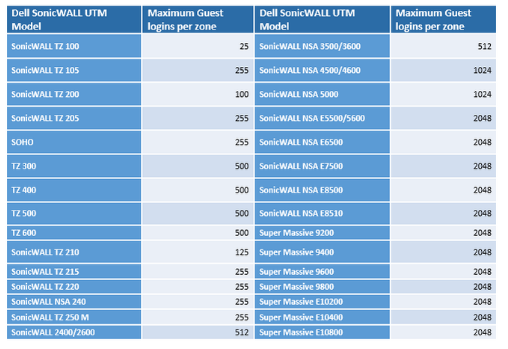
You should check your Sonicwall maximum connection for guest.


2015年7月2日 星期四

How to add / renew Office 365 by Volume License Paper


For new purchase and renew you have two options

1. Purchase Online (Pay by Credit Card for Month or Year)
2. Purchase Volume License (Purchase from Vendor / Partners)
   *** first time redeem code please click this link https://portal.office.com/Commerce/ProductKeyStart.aspx?ms.officeurl=setup365

Volume License renew can change to use credit card, temporary i still don't know how to change credit card renew to volume license key, i should waiting the term end date to try the options..


How long about Volume license purchase process
Purchase the volume license, Vendor/Partners just take within few working hours to place the order from Microsoft, user will get the following e-mail for activate the product, actually almost next working day you will got the license from e-mail.


Start the Activation Process

Step 1. - After order the license, you will receive above mail, you can click "Please click here to get started with your online service."


Step 2. - Check your Organization Name if correct, click the below "Sign-in with your domain name"


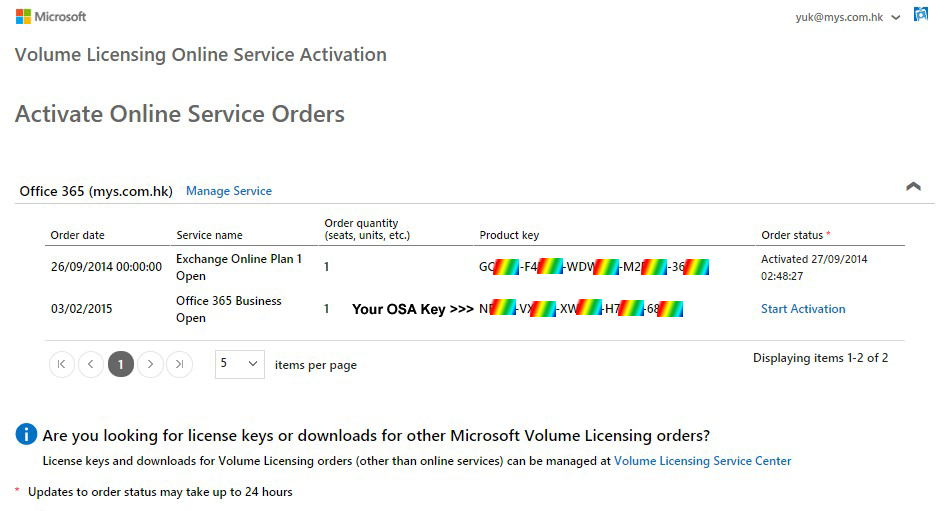
Step 3. - You will see the following product key, please copy and paste copy the product key, don't use "Start Activation"

 Step 4. - https://portal.office.com/admin/default.aspx << Sign-in Admin Portal, on Left Panel select "Billing" > "Subscription", select the subscription you wish to renew, on right panel click "Renew or add user license"


Step 5. -  Choose "Use a new and unused product key"


Step 6. - Enter the product key

Step 7. - You can renew current subscription or add 1 user license, the following will explain more about the difference.

Add new user license on existing subscription can apply on the following situration :
 - This is a way to change online payment back to volume license 
 - Add new user license and make all license as same term end date, you can check the picture description how to calculate the service month if you add the new license.

Renew your subscription just is renew only.


2015年6月15日 星期一

Wireless Spec

Wireless 規格分為 IEEE 802.11 a/b/g/n 及 ac ,主要分別都是速度。

Wi-Fi使用的radio frequency頻段為2.4GHz或者5GHz,簡單整理成下表:
Protocol
Frequency
Max PHY Rate
Inside
Outside
Legacy
2.4-2.5GHz
2Mbps
-
-
802.11a
5.15-5.35GHz
5.47-5.725GHz
5.725-5.875GHz
54Mbps
30m
45m
802.11b
2.4-2.5GHz
11Mbps
30m
100m
802.11g
2.4-2.5GHz
54Mbps
30m
100m
802.11n
2.4 / 5GHz
150Mbps(40MHz * 1MIMO)
600Mbps(40MHz * 4MIMO)
70m
250m
802.11ac
5GHz
200Mbps(40MHz * 1MIMO)
433.3Mbps(80MHz * 1MIMO)
866.7Mbps(160MHz * 1MIMO)
35m

資料來自http://bryceknowhow.blogspot.hk/2013/11/wi-fi-ieee-80211-abgnac.html

以下將細談 802.11n 的設定及選擇...

 - IEEE802.11n 是支援2.4Ghz及5Ghz 頻道而 802.11ac 只支援5Ghz頻道
 - Wireless N 有 MIMO功能,2.4Ghz可使每支天線達到150Mbps的傳輸速度,簡單來講,雙天線可以有300Mpbs速度,3天線有450Mpbs速度,而5Ghz可使每支天線達到300Mbps的傳輸速度,雙天線就有600Mpbs速度。***
 - 2.4Ghz與5Ghz的優點缺點是2.4Ghz有長遠的距離,而5Ghz則有大的頻寛速度較快,但5Ghz的穿透力很弱。
 - 在2.4Ghz即使有3天線450Mpbs速度由於香港密度太高四圍都是Router,2.4Ghz Wi-Fi Router重疊基本上行到穏定的40-50Mbps已經十分難得。最好使用DualBand 5Ghz或AC 5Ghz頻道,最小應該都可以達致100Mbps傳輸速度。


*** 注意這是頻寛速度,假如你的Router有4天線600Mpbs速度,家裹有10個設備使用Wi-Fi,600Mpbs是這十個設備的總頻寛,而並不是每個設備均可以同一時間有600Mpbs上下載速度。

N Data Rate Speed, 有些Router可以選擇MCS速度,一般為Auto。
MCS
index
Spatial
streams
Modulation
type
Coding
rate
Data rate (Mbit/s)
20 MHz channel40 MHz channel
800 ns GI400 ns GI800 ns GI400 ns GI
01BPSK1/26.57.213.515
11QPSK1/21314.42730
21QPSK3/419.521.740.545
3116-QAM1/22628.95460
4116-QAM3/43943.38190
5164-QAM2/35257.8108120
6164-QAM3/458.565121.5135
7164-QAM5/66572.2135150
82BPSK1/21314.42730
92QPSK1/22628.95460
102QPSK3/43943.38190
11216-QAM1/25257.8108120
12216-QAM3/47886.7162180
13264-QAM2/3104115.6216240
14264-QAM3/4117130243270
15264-QAM5/6130144.4270300
163BPSK1/219.521.740.545
173QPSK1/23943.38190
183QPSK3/458.565121.5135
19316-QAM1/27886.7162180
20316-QAM3/4117130243270
21364-QAM2/3156173.3324360
22364-QAM3/4175.5195364.5405
23364-QAM5/6195216.7405450
244BPSK1/22628.85460
254QPSK1/25257.6108120
264QPSK3/47886.8162180
27416-QAM1/2104115.6216240
28416-QAM3/4156173.2324360
29464-QAM2/3208231.2432480
30464-QAM3/4234260486540
31464-QAM5/6260288.8540600
321BPSK1/2N/AN/A6.06.7


asd

2015年6月4日 星期四

CSS Page can't be display ( Skype Login Page Broken / Windows 10 Reserve Broken )

Sample , if you got the following problem, please download this file and apply it, merge to registry, close and open it again, it will back to normal


2015年3月6日 星期五

Where can i find my OSA key


1. Sign in your Volume Licensing Service Center, if you do not have the account, please sign up now.
https://www.microsoft.com/licensing/servicecenter/default.aspx

2. Please make sure you already add the license to your account, you can click Licenses > Relationship Summary > then click Add Open License to add the license


3. Click Online Service Activation, select the License ID and click Manage Activations 


4. click Sign-in with xxxxxxx.xxx << Your domain


5. You can find your OSA key and you can click "Start Activation" to activate your product, or try redeem instruction.


If you got any problem for Microsoft Volume Licensing, you can contact Microsoft Volume Licensing Support