時下購買 Wi-Fi Router 請購買有 5Ghz Wireless Router, 只有2.4Ghz的Wireless Router其實很不在很不適合香港地方使用。
5Ghz Wi-Fi 信號的最大好處,速度比2.4Ghz快,但穿透力極差所以會怕坐房的同事接收唔到
2.4GHz Wi-Fi 信號的最大好處係穿透力高,但速度比5Ghz慢,但致命點係受干擾
當你使用手機搜尋無線時你會發現很多無線Router,基本上所有2.4Ghz 頻道內的頻譜很小,當Wi-Fi router接收到信號只會回應正確密碼的設備,不正確密碼的需不作回應但接收到信號時已使用了其頻寬,你不能想像佢絕大部份都唔係幫你做緊野,係不停咁收到信號又要reject, 所以會出現慢的情況,當你覺得隻Wi-Fi慢時,往往會考慮換隻接收勁D既Wi-Fi, 結果係你受干擾既距離更加大,死既人就越來越多,下圖係我屋企既Wi-Fi 2.4GHz (MYS)及5Ghz (MYS 5Ghz), 你可以睇到 2.4Ghz 得13條Channel, MYS係Channel 1但係其實cover到去Channel 3底層既Wi-Fi互相重疊到連名都睇唔到! 我係屋企用2.4Ghz Wi-Fi 基本上係慢到用唔到,有時download ok 50MB, upload 得0.1MB,而5Ghz Channel 基本上因為穿透力低根本收唔到隔離屋既信號所以速度及穏定性都很高!
早前購買左Apple Airport Extreme, 可以單一SSID同時接收2.4Ghz及5Ghz頻道,使用了一個多月,實在很不理常,行雙頻道本來係好好既設計,但有時係真係唔知你們的手機會接左去2.4Ghz定5Ghz, 假如去左2.4Ghz可能就會很慢, 因為係受干擾速度慢,而唔係接收唔到,所以佢唔會調返去5Ghz,因為無法控制所以我建議拆返開兩個SSID用一定會比單SSID雙頻好!
AirPort Utility > Wireless > Wireless Options > Enable 5Ghz 就可以分開不同SSID不同頻道,咁唔一定個個人都要咁做,好似上圖咁你唔拆開一定唔掂,但如果你住半山密度低基本上都唔洗點怕受太多干擾就梗係單SSID雙Channel啦。
2016年4月11日 星期一
2016年4月6日 星期三
Office 365 Exchange Online Setting
Distribution Group E-Mail
- coming
Grand permission to Staff A open Staff B mailbox
- coming
Configure Exchange Mode for Outlook 2013/2016
Please refer the official link, watch a video
https://support.office.com/en-us/article/Set-up-email-in-Outlook-6e27792a-9267-4aa4-8bb6-c84ef146101b?ui=en-US&rs=en-US&ad=US
POP3, IMAP and SMTP setting
When you change E-mail services to Office365, remember you have a lot of equipment/application may not sent e-mail anymore because you need to update the smtp server name, port and username/password.
Will using SMTP equipment/application
e.g. Copier Scan to E-Mail, Server iLO/iMM/iDrac, Server/NAS/Hardware/Software application warning/error notification e-mail.
If you’re connecting to your Office 365 for business email, you don’t need to look up your settings. For Office 365 for business, use the following settings.
* Some clients refer to implicit TLS as SSL.
source from https://support.office.com/en-us/article/Outlook-settings-for-POP-and-IMAP-access-for-Office-365-for-business-or-Microsoft-Exchange-accounts-7fc677eb-2491-4cbc-8153-8e7113525f6c?ui=en-US&rs=en-US&ad=US
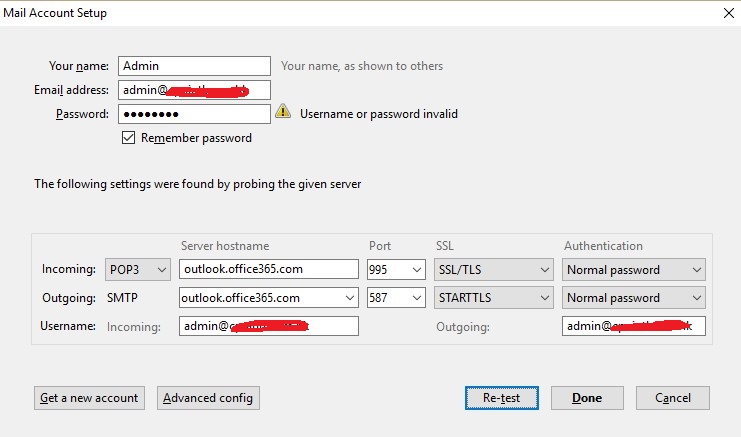
This is sample such as configure Office 365 Pop3/SMTP mode on Thunderbird or Non-support Exchange Mode mail client.
The following problem is i tried before.
Trial / Start Office 365 Exchange Online
Problem :
Always hang on, we're not quite ready when you access the mailbox
First time register the trial Office 365 for your domain, you should using xxxxxx.onmicrosoft.com to setup a mailbox first, once everything is done and you can access the mailbox on web, then you can set your domain as default and create another user account.
I tried if i quick start a trial and setup my company domain as default and i never try access the mailbox on web, Office 365 may be can't create a mailbox for your domain, so should using onmicrosoft.com first.
Always show we are preparing a mailbox for this user
Solution :
Try change xxxxx.onmicrosoft.com is your default domain, access the mailbox then change back your company domain to default.
Mailbox Database and delete the old mail.
Current each mailbox basic is 50GB mailbox, when you delete the mail and empty the deleted item folders, you can free up more space on your mailbox, but all of your deleted item you can recovery on 30 days, that mean even you empty the deleted item, you also can recovery with-in 30day, actually on background each user have 50GB storage for store deleted item. So what's the problem? If background 50GB storage for recovery deleted item is full and no space, all delete the e-mail and empty the folder it will show up again, just like can't delete the mail, this is cause by user delete e-mail over 50GB with-in 30 days, the only way is call Microsoft for temporary increase the background storage or wait few day for reduce the background storage.
Problem :
E-mail come up after delete.
Cause :
User delete e-mail over 50GB with-in 30 days
Solution :
call Microsoft for temporary increase the background storage or wait few day for reduce the background storage.
Distribution Group E-Mail
- coming
Grand permission to Staff A open Staff B mailbox
- coming
Configure Exchange Mode for Outlook 2013/2016
Please refer the official link, watch a video
https://support.office.com/en-us/article/Set-up-email-in-Outlook-6e27792a-9267-4aa4-8bb6-c84ef146101b?ui=en-US&rs=en-US&ad=US
POP3, IMAP and SMTP setting
When you change E-mail services to Office365, remember you have a lot of equipment/application may not sent e-mail anymore because you need to update the smtp server name, port and username/password.
Will using SMTP equipment/application
e.g. Copier Scan to E-Mail, Server iLO/iMM/iDrac, Server/NAS/Hardware/Software application warning/error notification e-mail.
If you’re connecting to your Office 365 for business email, you don’t need to look up your settings. For Office 365 for business, use the following settings.
* Some clients refer to implicit TLS as SSL.
source from https://support.office.com/en-us/article/Outlook-settings-for-POP-and-IMAP-access-for-Office-365-for-business-or-Microsoft-Exchange-accounts-7fc677eb-2491-4cbc-8153-8e7113525f6c?ui=en-US&rs=en-US&ad=US
This is sample such as configure Office 365 Pop3/SMTP mode on Thunderbird or Non-support Exchange Mode mail client.
The following problem is i tried before.
Trial / Start Office 365 Exchange Online
Problem :
Always hang on, we're not quite ready when you access the mailbox
I tried if i quick start a trial and setup my company domain as default and i never try access the mailbox on web, Office 365 may be can't create a mailbox for your domain, so should using onmicrosoft.com first.
Always show we are preparing a mailbox for this user
Solution :
Try change xxxxx.onmicrosoft.com is your default domain, access the mailbox then change back your company domain to default.
Mailbox Database and delete the old mail.
Current each mailbox basic is 50GB mailbox, when you delete the mail and empty the deleted item folders, you can free up more space on your mailbox, but all of your deleted item you can recovery on 30 days, that mean even you empty the deleted item, you also can recovery with-in 30day, actually on background each user have 50GB storage for store deleted item. So what's the problem? If background 50GB storage for recovery deleted item is full and no space, all delete the e-mail and empty the folder it will show up again, just like can't delete the mail, this is cause by user delete e-mail over 50GB with-in 30 days, the only way is call Microsoft for temporary increase the background storage or wait few day for reduce the background storage.
Problem :
E-mail come up after delete.
Cause :
User delete e-mail over 50GB with-in 30 days
Solution :
call Microsoft for temporary increase the background storage or wait few day for reduce the background storage.
2016年2月23日 星期二
MFCMAPI
http://mfcmapi.codeplex.com/
Use for check the e-mail information such as Outlook Conversation ID, Attachment
2016年2月22日 星期一
Disable Windows 10 Upgrade
1. Download a Tools
2. Run it
3. Click "Click to Disable 'Get Windows 10' App
4. Click "Click to Prevent Windows 10 Upgrades"
Remove or uninstall Language packs in Windows 10
If you wish to uninstall Language Packs, you may open a command
prompt windows, type the following and hit Enter.
Lpksetup /u
The Install or Uninstall display languages panel will open.
2015年11月13日 星期五
Domain Group Policy Deploy Printer for all client PC
First we should install the printer on Windows Server and share the printer
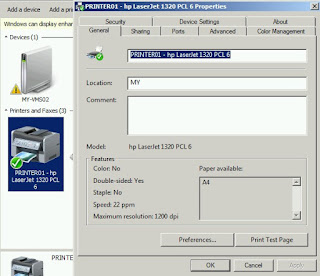
For good to management, you should plan the printer name and share name, if you have two hp Laserjet 1320 printer, every printer you should assign the name such as "PRINTER01" and "PRINTER02" for difference printer.
For Example : (If you not desire the good name, after your company grow and have a lot of printer, you will need to change back the name, it will make you crazy)
PRINTER01 - hp LaserJet 1320 PCL6
PRINTER01 - hp LaserJet (For Account Statement Format)
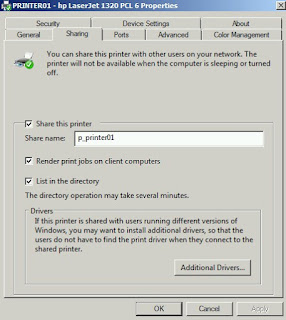
Click "Sharing", share name use p_printer01 for starting, other you can use p_printer01_a, etc...
(about the permission, here will not explain too much, please search on google)
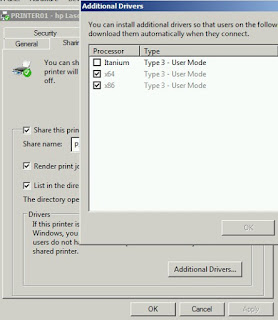
Remember Additional Drivers should installed x64 & x86 for difference OS
You should preset the printer before deploy it, once computer connected it will assign all setting.
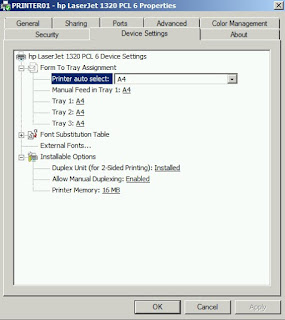
Advanced page > Printing Defaults
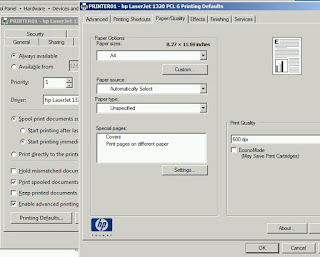
-----------------------------------------
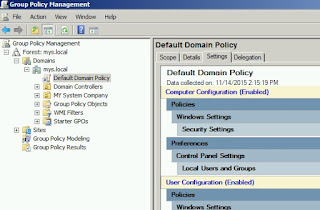
Open the Group Policy Management > Click "Default Domain Policy" > right hand side click "settings"
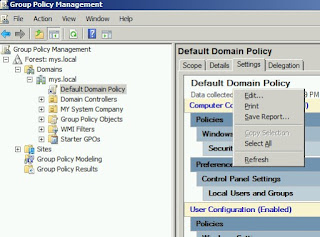
Right click mouse and click "Edit"
Here have two method to connect the printer, First is using Deploy Printer and Second is Connect to Printer
Method 1 : (Caution it will become many trouble if you change printer/share name)
Advantage
- Client can't delete the printer
Disadvantage
- If someone on server rename the printer/share name, change drive may cause client computer can't remove the deployed printer, if will hard to fix if you got a lot of client machine, so you should very understand what are you do on this method.
Under Group Policy > User Configuration > Windows Settings > Depolyed Printers > Click "Deploy Printer"
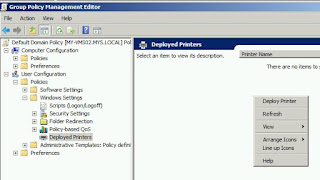
Type the link and add, then click "OK", after computer restart and login, it will connected and auto install the driver on client machine.
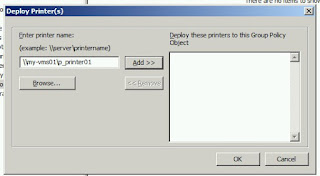
Remark :
- Client Computer should no right to remove deployed printer
- If you remove deployed printer on Policy, all client should automatically remove printer on client machine, the driver will still leave on client machine.
- If you need to change the printer/share name, you should create a new share printer and deploy a new printer, don't just change name on printer, it will loss connection.
- If printer is gone or replaced new printer, you can remove deployed printer on policy, but i suggest don't delete and change printer/share name, just leave here and keep at least a year to make sure all client machine is removed deployed printer.
Method 2 :
Advantage
- Easy to management, user allow to delete the printer
Disadvantage
- Client Machine can't get driver for server, so if your computer does not have same driver installed, the printer will not connect.
Under Group Policy > User Configuration > Preferences > Control Panel Settings > Printers > Right Click "New" > "Shared Printer"
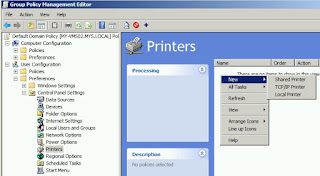
Action "Create", Type the Share name and OK
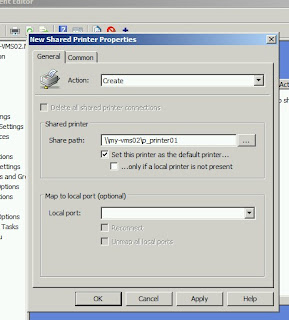
Remark :
- This is same as you type \\my-vms01\p_printer01 on CTRL+R, but it will always connect after login the computer even you delete the printer.
- You should already installed the printer driver on computer else it will not work and prompt the driver install screen.
For good to management, you should plan the printer name and share name, if you have two hp Laserjet 1320 printer, every printer you should assign the name such as "PRINTER01" and "PRINTER02" for difference printer.
For Example : (If you not desire the good name, after your company grow and have a lot of printer, you will need to change back the name, it will make you crazy)
PRINTER01 - hp LaserJet 1320 PCL6
PRINTER01 - hp LaserJet (For Account Statement Format)

Click "Sharing", share name use p_printer01 for starting, other you can use p_printer01_a, etc...
(about the permission, here will not explain too much, please search on google)

Remember Additional Drivers should installed x64 & x86 for difference OS

You should preset the printer before deploy it, once computer connected it will assign all setting.

Advanced page > Printing Defaults

-----------------------------------------
Open the Group Policy Management > Click "Default Domain Policy" > right hand side click "settings"

Right click mouse and click "Edit"

Here have two method to connect the printer, First is using Deploy Printer and Second is Connect to Printer
Method 1 : (Caution it will become many trouble if you change printer/share name)
Advantage
- Client can't delete the printer
Disadvantage
- If someone on server rename the printer/share name, change drive may cause client computer can't remove the deployed printer, if will hard to fix if you got a lot of client machine, so you should very understand what are you do on this method.
Under Group Policy > User Configuration > Windows Settings > Depolyed Printers > Click "Deploy Printer"

Type the link and add, then click "OK", after computer restart and login, it will connected and auto install the driver on client machine.

Remark :
- Client Computer should no right to remove deployed printer
- If you remove deployed printer on Policy, all client should automatically remove printer on client machine, the driver will still leave on client machine.
- If you need to change the printer/share name, you should create a new share printer and deploy a new printer, don't just change name on printer, it will loss connection.
- If printer is gone or replaced new printer, you can remove deployed printer on policy, but i suggest don't delete and change printer/share name, just leave here and keep at least a year to make sure all client machine is removed deployed printer.
Method 2 :
Advantage
- Easy to management, user allow to delete the printer
Disadvantage
- Client Machine can't get driver for server, so if your computer does not have same driver installed, the printer will not connect.
Under Group Policy > User Configuration > Preferences > Control Panel Settings > Printers > Right Click "New" > "Shared Printer"

Action "Create", Type the Share name and OK

- This is same as you type \\my-vms01\p_printer01 on CTRL+R, but it will always connect after login the computer even you delete the printer.
- You should already installed the printer driver on computer else it will not work and prompt the driver install screen.
2015年11月10日 星期二
File Replication Services Ntfrs Error / Domain can't sync SYSVOL
CAUSE :
- Already have Windows 2003 Domain Controller, add one Windows 2008 R2 and promo to Active Directory, Event show Ntfrs error can't sync SYSVOL.
- 新加入2008 R2的Domain Controller到2003 Domain Controller上,但發現SYSVOL無法同步,\\servername\ 沒有sysvol等資料夾
Resolution (The following action is same, but came from difference website, Point 3 will easy to understand)
1. https://social.technet.microsoft.com/Forums/windowsserver/en-US/5a4b3647-0641-4a1a-9389-154d92b44730/the-file-replication-service-is-having-trouble-enabling-replication?forum=winserverDS
2. http://www.eventid.net/display.asp?eventid=13508&eventno=349&source=ntfrs&phase=1
3. http://www.squidworks.net/2011/09/ntfrs-journal-wrap-errors-detected-on-domain-controller/
- Already have Windows 2003 Domain Controller, add one Windows 2008 R2 and promo to Active Directory, Event show Ntfrs error can't sync SYSVOL.
- 新加入2008 R2的Domain Controller到2003 Domain Controller上,但發現SYSVOL無法同步,\\servername\ 沒有sysvol等資料夾
Resolution (The following action is same, but came from difference website, Point 3 will easy to understand)
1. https://social.technet.microsoft.com/Forums/windowsserver/en-US/5a4b3647-0641-4a1a-9389-154d92b44730/the-file-replication-service-is-having-trouble-enabling-replication?forum=winserverDS
2. http://www.eventid.net/display.asp?eventid=13508&eventno=349&source=ntfrs&phase=1
3. http://www.squidworks.net/2011/09/ntfrs-journal-wrap-errors-detected-on-domain-controller/
訂閱:
文章 (Atom)