2015年7月2日 星期四

How to add / renew Office 365 by Volume License Paper


For new purchase and renew you have two options

1. Purchase Online (Pay by Credit Card for Month or Year)
2. Purchase Volume License (Purchase from Vendor / Partners)
   *** first time redeem code please click this link https://portal.office.com/Commerce/ProductKeyStart.aspx?ms.officeurl=setup365

Volume License renew can change to use credit card, temporary i still don't know how to change credit card renew to volume license key, i should waiting the term end date to try the options..


How long about Volume license purchase process
Purchase the volume license, Vendor/Partners just take within few working hours to place the order from Microsoft, user will get the following e-mail for activate the product, actually almost next working day you will got the license from e-mail.


Start the Activation Process

Step 1. - After order the license, you will receive above mail, you can click "Please click here to get started with your online service."


Step 2. - Check your Organization Name if correct, click the below "Sign-in with your domain name"


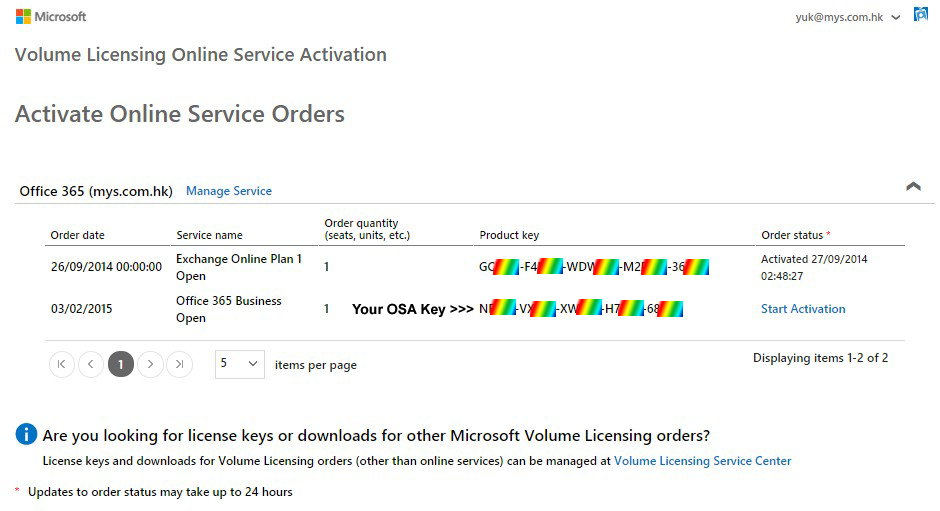
Step 3. - You will see the following product key, please copy and paste copy the product key, don't use "Start Activation"

 Step 4. - https://portal.office.com/admin/default.aspx << Sign-in Admin Portal, on Left Panel select "Billing" > "Subscription", select the subscription you wish to renew, on right panel click "Renew or add user license"


Step 5. -  Choose "Use a new and unused product key"


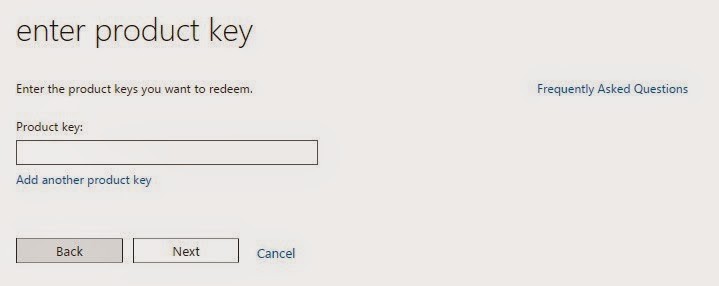
Step 6. - Enter the product key

Step 7. - You can renew current subscription or add 1 user license, the following will explain more about the difference.

Add new user license on existing subscription can apply on the following situration :
 - This is a way to change online payment back to volume license 
 - Add new user license and make all license as same term end date, you can check the picture description how to calculate the service month if you add the new license.

Renew your subscription just is renew only.


2015年6月15日 星期一

Wireless Spec

Wireless 規格分為 IEEE 802.11 a/b/g/n 及 ac ,主要分別都是速度。

Wi-Fi使用的radio frequency頻段為2.4GHz或者5GHz,簡單整理成下表:
Protocol
Frequency
Max PHY Rate
Inside
Outside
Legacy
2.4-2.5GHz
2Mbps
-
-
802.11a
5.15-5.35GHz
5.47-5.725GHz
5.725-5.875GHz
54Mbps
30m
45m
802.11b
2.4-2.5GHz
11Mbps
30m
100m
802.11g
2.4-2.5GHz
54Mbps
30m
100m
802.11n
2.4 / 5GHz
150Mbps(40MHz * 1MIMO)
600Mbps(40MHz * 4MIMO)
70m
250m
802.11ac
5GHz
200Mbps(40MHz * 1MIMO)
433.3Mbps(80MHz * 1MIMO)
866.7Mbps(160MHz * 1MIMO)
35m

資料來自http://bryceknowhow.blogspot.hk/2013/11/wi-fi-ieee-80211-abgnac.html

以下將細談 802.11n 的設定及選擇...

 - IEEE802.11n 是支援2.4Ghz及5Ghz 頻道而 802.11ac 只支援5Ghz頻道
 - Wireless N 有 MIMO功能,2.4Ghz可使每支天線達到150Mbps的傳輸速度,簡單來講,雙天線可以有300Mpbs速度,3天線有450Mpbs速度,而5Ghz可使每支天線達到300Mbps的傳輸速度,雙天線就有600Mpbs速度。***
 - 2.4Ghz與5Ghz的優點缺點是2.4Ghz有長遠的距離,而5Ghz則有大的頻寛速度較快,但5Ghz的穿透力很弱。
 - 在2.4Ghz即使有3天線450Mpbs速度由於香港密度太高四圍都是Router,2.4Ghz Wi-Fi Router重疊基本上行到穏定的40-50Mbps已經十分難得。最好使用DualBand 5Ghz或AC 5Ghz頻道,最小應該都可以達致100Mbps傳輸速度。


*** 注意這是頻寛速度,假如你的Router有4天線600Mpbs速度,家裹有10個設備使用Wi-Fi,600Mpbs是這十個設備的總頻寛,而並不是每個設備均可以同一時間有600Mpbs上下載速度。

N Data Rate Speed, 有些Router可以選擇MCS速度,一般為Auto。
MCS
index
Spatial
streams
Modulation
type
Coding
rate
Data rate (Mbit/s)
20 MHz channel40 MHz channel
800 ns GI400 ns GI800 ns GI400 ns GI
01BPSK1/26.57.213.515
11QPSK1/21314.42730
21QPSK3/419.521.740.545
3116-QAM1/22628.95460
4116-QAM3/43943.38190
5164-QAM2/35257.8108120
6164-QAM3/458.565121.5135
7164-QAM5/66572.2135150
82BPSK1/21314.42730
92QPSK1/22628.95460
102QPSK3/43943.38190
11216-QAM1/25257.8108120
12216-QAM3/47886.7162180
13264-QAM2/3104115.6216240
14264-QAM3/4117130243270
15264-QAM5/6130144.4270300
163BPSK1/219.521.740.545
173QPSK1/23943.38190
183QPSK3/458.565121.5135
19316-QAM1/27886.7162180
20316-QAM3/4117130243270
21364-QAM2/3156173.3324360
22364-QAM3/4175.5195364.5405
23364-QAM5/6195216.7405450
244BPSK1/22628.85460
254QPSK1/25257.6108120
264QPSK3/47886.8162180
27416-QAM1/2104115.6216240
28416-QAM3/4156173.2324360
29464-QAM2/3208231.2432480
30464-QAM3/4234260486540
31464-QAM5/6260288.8540600
321BPSK1/2N/AN/A6.06.7


asd

2015年6月4日 星期四

CSS Page can't be display ( Skype Login Page Broken / Windows 10 Reserve Broken )

Sample , if you got the following problem, please download this file and apply it, merge to registry, close and open it again, it will back to normal


2015年3月6日 星期五

Where can i find my OSA key


1. Sign in your Volume Licensing Service Center, if you do not have the account, please sign up now.
https://www.microsoft.com/licensing/servicecenter/default.aspx

2. Please make sure you already add the license to your account, you can click Licenses > Relationship Summary > then click Add Open License to add the license


3. Click Online Service Activation, select the License ID and click Manage Activations 


4. click Sign-in with xxxxxxx.xxx << Your domain


5. You can find your OSA key and you can click "Start Activation" to activate your product, or try redeem instruction.


If you got any problem for Microsoft Volume Licensing, you can contact Microsoft Volume Licensing Support

2015年3月5日 星期四

How to Activate Your Office 365


1. Go to https://portal.office.com/commerce/productkeystart.aspx

2. Click the box that you are acknowledge and got permission to be the Office 365 administrator for the organization, then click on Start.
3. Enter the OSA key from the step one, then click on Next.

Where can i find my OSA key?


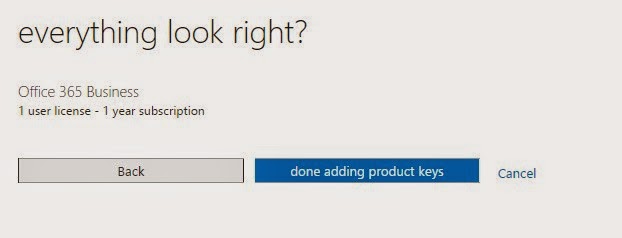
4. click done adding product keys


5.       click start step 2

6.       You can set up your new Office 365 account or click sign in to login existing account


2015年3月4日 星期三

TP-Link WPA271KIT HomePlug Information


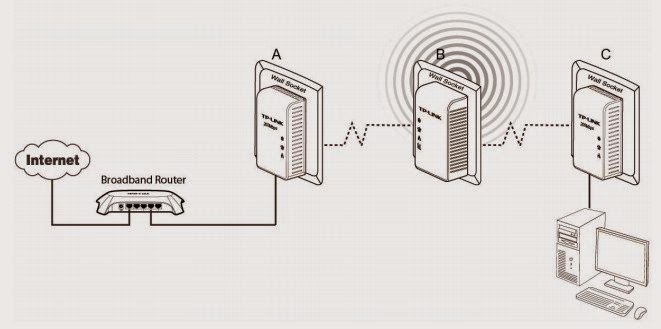
Create a Powerline network using the Pair button

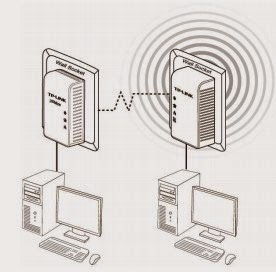
You can connect a number of devices on a powerline network, but you can use the Pair button on only two devices at a time.

Step 1. Press and hold the Pair button of Powerline device A TL-PA211 for 3 to 8 seconds, the Power LED will start flashing.

Step 2. Press and hold the Pair button of Powerline device B TL-WPA281 for 1 second, the Power LED will start flashing. (This must be done within 120 seconds after pressing the Pair button of Powerline device A.)

Step 3. Wait for about 60 seconds while your Powerline device A and B are connecting. The Power LED on both devices will stop flashing and become solid light when the connection is made.


Join an existing Powerline Network:

Powerline device A and Powerline device B form a HomeplugAV Network, and Powerline device C wants to join this network.


Step 1. Press and hold the Pair button on Powerline device C TL-PA211 for 3 to 8 seconds.

Step 2. Press and hold the Pair button on Powerline device A/B for 1 second/3 to 8 seconds. (This step must be taken within 120 seconds after step 1 is finished.)

Step 3. Wait for about 60 seconds while your Powerline devices are connecting. The Power LED on Powerline device A/B and C will stop flashing and become solid light when the connection is made.


Leave an existing Powerline Network: 

As the figure above shows, Powerline device A, B and C have formed a HomeplugAV Network. The user wants to remove one device (Powerline adapter C) from this network.

Step 1. Press and hold the Pair button on Powerline device C for at least 10 seconds. Powerline device C will reset and restart.

Step 2. Wait for the reset to complete.


Reset 
To reset the Powerline device:

Press and hold the Reset button for about 10 seconds, and then release the button. You will see all LEDs begin to flash. At this moment, the default settings have been restored. Be careful, don’t power off when the device is in reset process.

2015年2月28日 星期六

iPhone 6 爆Monitor 維修

28-Feb-2015 今日跌爆左個iPhone 6以下是維修時需知,價錢及程序!  跌爆Monitor當日好急,返左屋企做完Backup即刻就去左Retail Store,點知排隊都只係做Booking預約,約左2-Mar-2015。
2-Mar-2015 預早11:55己經去到Apple Store,姐姐仔來幫我登記及料解情況,其實視乎損壞情況啦,因為隨爆Mon外,機身多處位置都花了,如果沒有存貨可更換手機的話,我就換Mon算啦,適逢有貨所以俾$2368成部換左去,當然換機佢一定唔係俾賣街packing的iPhone你,佢係俾維修更換用packing的iPhone,即係Apple佢地認證過全新或番新既iPhone,呢點大家要留意因為係番新所以要驗清楚,收左貨出左門口有問題你行返入去佢唔會換俾你,只會做維修,我收到第一部機即彈,Screen內有一粒黑點的塵,第二部才收貨。


 維修程序
   
- 先致電Apple Support預約維修 iPhone, 如果你 Walk-in 去Apple Shop除非冇人做維修啦,如果唔係你去到就係排隊做booking.

- 如果手機仲可以開到機請先用電腦 iTunes把 iPhone Backup一次先,如果你平時做開個Backup就好快攪掂,如果你從來冇做過,個backup可能要做1-2個鐘視乎你有幾多Data。#註1

- 預約好日期維修當天需準時到Apple Retail Store 交付手機驗查及報價,維修約需時48小時,如更換手機則視乎存貨,有存貨可以即時更換,費用一般如下 :

以下是保養期內意外跌爛iPhone Monitor Screen費用
$848 更換 iPhone Screen (如iPhone Case灣曲導致不能更換Monitor Screen則需整部手機更換。
$2368 更換整個 iPhone 手機 (注意是維修用的全新或番新iPhone,包裝與零售版本不同)
$868及$2368基本上係與保養無關,即係買機到手未滿7天/未滿一年/過晒保養都係呢個價錢,因為跌爛並唔係本身機件問題,係人為損壞。
$548 更換整個 iPhone 手機 (只限 AppleCare+)
*** 任何並非人為損壞Apple保養是包含在內的,如果你的iPhone是明顯坐灣左,應該係計算在人為損壞,如果好輕微灣曲如玉眼不能分辨出來,我個人認為可以懶產品質量問題要求維修或更換,iPhone內多處位置都有試水紙,如因入水導致損壞係講唔過的。

 - 維修或更換完手機回家用iTunes restore backup便可以還原所有資料。


 (以上係2015年我更維修iPhone6價錢參考好啦)


AppleCare Plus
如果你係全新手機及購買未滿60天,你可以購買額外既AppleCare+ $688 , 需另外俾$548元意外保障就可以更換成部手機,但只限兩次!抵唔抵就視乎你點玩,如果你係裸跑朋友,我建議買機時一定要買埋AppleCare+,裸跑一至兩年部機一定由頭花到尾,介時換其他手機想把現有手機乾乾淨淨俾屋企人用俾多$548就ok, 或你有心理準備一定跌爛AppleCare+一定抵D。


 *** 注意必需在購買手時一拼購買或購買後60天內到Retail Store購買,Retail Store會驗查你購買紀錄及驗查手機沒有損壞才能成功購買。


#註1
關於備份,所有的備份是不會儲存密碼的,當回復手機後,電郵帳號,Wi-Fi密碼等等都需要重新輸入密碼,另外App內的設定大部份都會同備份前相同,但如果是Game的話如Chain Chronicle是必需用引繼才可以取回帳號,其他如Puzzle & Dragon則可以放心備份回復。