2014年3月7日 星期五

Wireless Connection for Windows

Lenovo ThinkVantage Access Connection
1. Lenovo Notebook一般會以自家軟件控制Wireless Connection而非使用Windows的Zero Configuration, 在右下角找到 ThinkVantage Access Connection Icon, double click it

2. Click 尋找WLAN

3. Double Click 你需要連接到的 Wi-Fi, 如無法找到, 可以按一下 Find Again

4. Double Click後需輸入Password

5. 等待驗証及取得IP Address

6. 成功連線後可以儲存設定你亦可以按取消不儲存設定及密碼


Windows 7

How to connect the Wi-Fi Network
1. Click "Network Connection Icon" on right coner
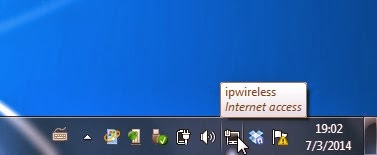


2. Click your Wi-Fi SSID and click "Connect"
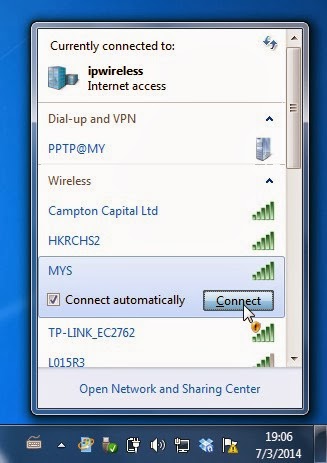


3. Enter the Wi-Fi Password


How to forgot the previous Wi-Fi Connection
 - Once you connect the Wi-Fi, it will store the setting on Windows, when you change the Wi-Fi security setting or Hardware equipment but still using the same SSID (e.g. MYS), it will never connect the Wi-Fi again and it will become the following screen.


1. Click the "Network Connection" icon on right coner
2. Click "Open Network and Sharing Center"
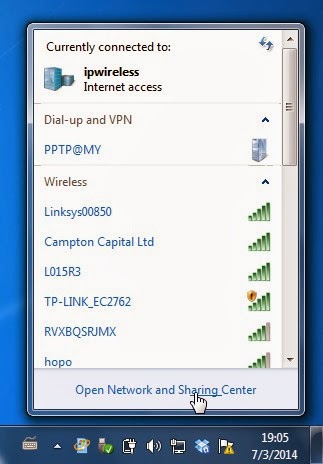


 3. Click "Manage Wireless Networks"
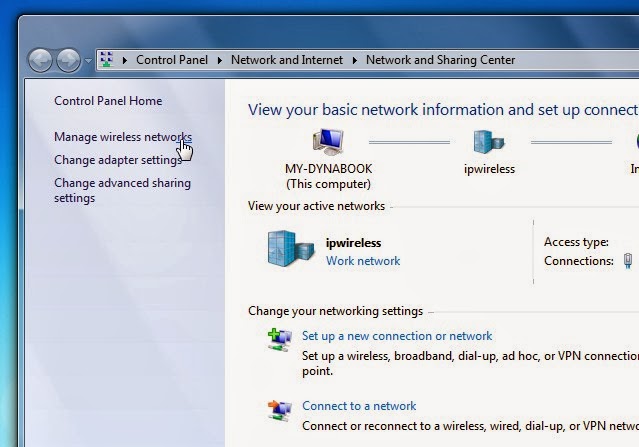
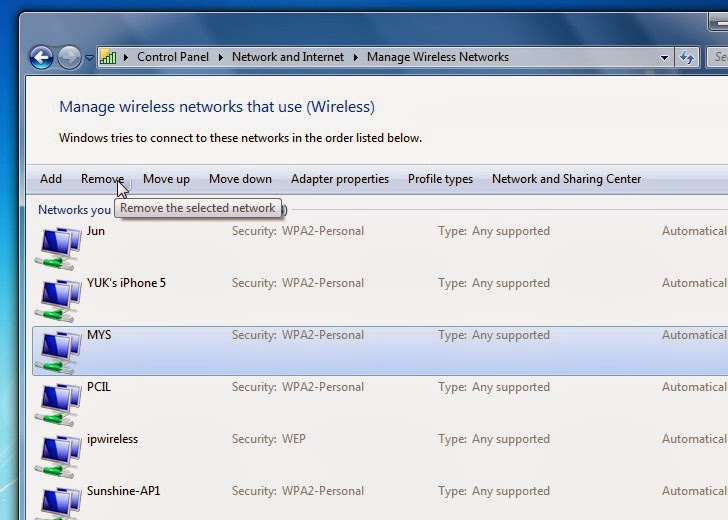
4. Click the store setting (e.g. MYS) and click "Remove", it will back to Normal and you can connect it again.


Windows 8.1

How to connect the Wi-Fi Network
1. Click "Network Connection" on right coner

2. Choose your WiFi SSID, click "Connect" and enter your Wi-Fi Password


How to forgot the previous Wi-Fi connection and reconnect it
1. You can't forgot the previous Wi-Fi connection
2. If your previous Wi-Fi connection got the problem to connect it will show the below picture.


3. Just click and connect it, then you need enter the password again, it will update the security type.


Apple Mac OS X v10.6.8

Simple just click icon > choice your wifi SSID and enter password

How to forgot the connection setting, click "Open Network Preferences"
Click Airport and Advanced

Click SSID and click Remove

2014年3月3日 星期一

Windows 8 / 8.1 Q&A

安裝或升級到 Windows 8.1 後, 右下角出現 ' 未正確設定安全開機 Build 9600 '
請參考以下連結下載Hotfix, Hotfix並不是修正或設定安全開機, 而是Microsoft出了一個Hotfix用來hidden呢個浮水印, 即係佢又整D bug出來!!
http://support.microsoft.com/kb/2902864/zh-hk

Windows 8.1 升級後, 不定時出現無法上網, 亦無法重新啟動電腦, 必需直接關機或reset
我的親身問題, 暫未找到解決辦法

Windows 8 或 8.1 為何沒有 Media Center
Windows 8版本Media Center變成了付費Apps, 可以在Market 巿集內搜索及購買, 按開始後 ALT+Q 打 Media Center


NVR Storage Calculator for IP CAM

Calculator Website
http://www.supercircuits.com/resources/tools/security-nvr-storage-calculator


2014年2月17日 星期一

How to Open .zip / .rar Compressed File

Some time we always receive the .rar attachment and we can't to open it,  you can download the 7-Zip freeware to open it.


7-Zip Official WebSite : http://www.7-zip.org
 - Direct Download 32-bit Version 7-Zip
 - Direct Download 64-bit Version 7-Zip

Additional information :
.rar  : RAR file format created by WinRAR software it is common on China only.
.zip  : ZIP file format created by WinZIP software it is common on the World.


Installation Instruction
   Step 1 : Run the file after download, Click Next


Step 2: Click "I accept xxxxxxx" and click Next

 Step 3. Click Next

Step 4. Click Install

 Step 5 : Click Finish

Step 6 : Save the attachment file to desktop


Step 7: Right click mouse on file > click 7-Zip > click "Extract to xxxxx\"

Step 8: You can click the extract folder to access the file now


2013年12月7日 星期六

Might & Magic : Heroes VI (Steam Version 英轉換簡體)


Steam用戶安裝後的Might & Magic 一定是英文版本, 遊戲本身其實已內置了簡體中文, 可以修改Registry使遊戲以簡體中文作顯示

需修改的Registry Key
HKEY_LOCAL_MACHINE->SOFTWARE->Wow6432Node->Ubisoft->Might & Magic Heroes VI
Language Value 由409改為804

由於Steam 或遊戲會把 804 改回 409所以我們需要修改Permission使Steam無法把Value修改
Right Click "Might & Magic Heroes VI" 選擇 "Permissions"

本來每個User都是Full Control Allow, 全部要Unclick Allow, 留Read Allow便可


修改後執行遊戲會看見整體已轉換為簡體中文, 但字體十分小很難觀看, 可以按以下連結下載一個檔案overwrite 本來文件便可

http://pan.baidu.com/share/link?shareid=3615714752&uk=3993116491

2013年12月5日 星期四

Microsoft Download Centre

Goto Microsoft Download Centre

Microsoft Fix 50470
 - Disk Mode change from ATA to AHCI (Windows Vista / 7)

Microsoft Security Essential (For Windows 7 / Vista / XP only)
 - Download Version : 4.4.0304.0 (10-Nov-2013)
   ****  下載時請注意選擇32bit 或 64bit 適當的版本, 安裝前請先把其他Anti-Virus移除, 否則可能導致電腦無法啟動 ****

Windows Installer
Installer 4.5 Redistributable (2-Jun-2008)
Installer 2.0 Redistributable Windows 2000 and Windows NT 4.0 (25-Sep-2001)
Installer 3.1 Redistributable (v2) (2-Sep-2005)

About .NET Framework
.NET Framework 4.5 (10-Sep-2012)
.NET Framework 3.5 Service Pack 1 (18-Nov-2008)
.NET Framework 2.0 Service Pack 2 (16-Jan-2009)
.NET Framework Version 1.1 Redistributable Package (17-Aug-2012)

Might & Magic Heroes VI - Application Error can't launch the game

話說剛剛從Steam購買了Might & Magic Heroes VI, 但無法啟動遊戲,先在家中電腦安裝了入到Game就Quit出來, 返到公司再安裝打算公司玩, 但安裝完在啟動時Windows出現Error, 算把啦可能公司電腦張Display唔夠Power, 返到屋企先玩, 返到屋企玩玩下死機後就出現同公司的Error :

Error on Pop-up Windows :
A problem caused the program to stop working correctly. Windows will close the program and notify you if a solution is available.

Error on Event Viewer :
Faulting application name: Might & Magic Heroes VI.exe, version: 2.1.1.0, time stamp: 0x51a5dce2
Faulting module name: Might & Magic Heroes VI.exe, version: 2.1.1.0, time stamp: 0x51a5dce2
Exception code: 0xc0000005
Fault offset: 0x002f8d19
Faulting process ID: 0x18d58
Faulting application start time: 0x01cef188335f5f58
Faulting application path: C:\Program Files (x86)\Steam\steamapps\common\Might and Magic Heroes VI\Might & Magic Heroes VI.exe
Faulting module path: C:\Program Files (x86)\Steam\steamapps\common\Might and Magic Heroes VI\Might & Magic Heroes VI.exe
Report ID: 771de78b-5d7b-11e3-beb5-001018cc50ef
Faulting package full name:
Faulting package-relative application ID:

最後發現係Game的ProfileData檔案出現問題, 這個檔案可用Notepad開啟, 是用來儲存遊戲等設定,但這個檔案內變成一連串空白字導致遊戲無法啟動及出現Error, 這個文件放在My Documents\Might & Magic Heroes VI\Profile Name\ 內, 由於有安裝Skydrive及互Sync 公司及家中電腦的My Document, 所以本來家中可以玩因為這個檔案被Sync為問題檔而另到家中電腦都無法玩, 相信不會人人都有這個情況, 如出現上術的Error可以試試以下方法 :

Step 1 : 到以下資料夾, 其實即是你的 My Document內會找到Might & Magic Heroes VI 資料夾
C:\Users\%username%\My Documents\Might & Magic Heroes VI\%ProfileName%\

Step 2 : 你可以找到 ProfileData, 把這個檔案名稱更改為 ProfileData1

Step 3 : 啟動遊戲,遊戲找不到ProfileData檔案會自動新成一個新的ProfileData, 將可解決這個問題