2017年7月7日 星期五

Office Product Key and Download

First Purchase activate the Office
How to check my installed office product key
How to change my office product key
Where can i download Office 2007/2010 for install my Office product.


First Purchase activate the Office


If you purchase Office 2013 and Office 2016, you should create a MS Office Account to hold your Office product key, Your box of product inside only have a key card, the physical key card is used for redeem the installation key, after redeem the installation Key the key card is no value rubbish.

I will suggest after redeem the installation key, you should write down the register Office Account e-mail and product installation key on this physical key card to identify you own this product.

Now starting to activate your office, please click the following link:
Http://www.office.com/setup <Only for Office 2013 and 2016

If you redeem more than one office product on your account, the page only Added Date to identify each office, so if you redeem 10 pcs as same time, you will hard to identify which one is new entry, because it will not sort by entry order , Each office account only hold 30 office product.

If you purchase the Office 2013/2016 in Hong Kong, once you redeem the product you have 3 language for choose, "Chinese Tradition", "Chinese PRC" and "English", even your physical product is english, you also choose Chinese language, but remind your redeem only have times to select the language you can not change later, but the installation key did not limit the language, your install key can use and install any language office, just your download page only your selected Language for download.


How to check my installed office product key

Open the "Command Prompt"

For 32-bit Office 2016
cscript "C:\Program Files (x86)\Microsoft Office\Office16\OSPP.VBS" /dstatus
For 64-bit Office 2016
cscript "C:\Program Files\Microsoft Office\Office16\OSPP.VBS" /dstatus
For 32-bit Office 2013
cscript "C:\Program Files (x86)\Microsoft Office\Office15\OSPP.VBS" /dstatus
For 64-bit Office 2013
cscript "C:\Program Files\Microsoft Office\Office15\OSPP.VBS" /dstatus
You will get last 5 characters of installed producy key

Login your Office Account and compare the key
http://www.office.com/myaccount


How to change my office product key


Open the "Command Prompt"

For 32-bit Office 2013
cscript "C:\Program Files (x86)\Microsoft Office\Office15\OSPP.VBS" /inpkey:yourkeygoeshere
For 64-bit Office 2013
cscript "C:\Program Files\Microsoft Office\Office15\OSPP.VBS" /inpkey:yourkeygoeshere 
Remark : If your product is Office 2016, please change Office15 to Office15


Where can i download Office 2007/2010 for install my Office product.


For Office 2010 (English) - https://products.office.com/en-us/office-2010
For Office 2010 (Chinese) - https://products.office.com/zh-hk/office-2010
For Office 2007 (English) - https://products.office.com/en-us/download-office-2007
For Office 2007 (Chinese) - https://products.office.com/zh-hk/download-office-2007


2017年7月6日 星期四

ValuNet Deluxe 萬利叻 (Version : 5.6)

客戶服務熱線 : 2917-8888
網址 : http://www.tradelink.com.hk/chi/customer_services/hotline_service.html

請先下載安裝說明及軟件
 - Installation Manual [chuyuk]
 - ValuNet Deluxe 5.6 [Official][chuyuk]


關於安裝:
請聯絡萬利叻技術支援熱線, 要求他們REMOTE替你安裝

介時需要Remote可以參考以下連結
http://chuyuk.blogspot.hk/2013/04/teamviewer-quicksupport.html

Chrome configure Flash setting

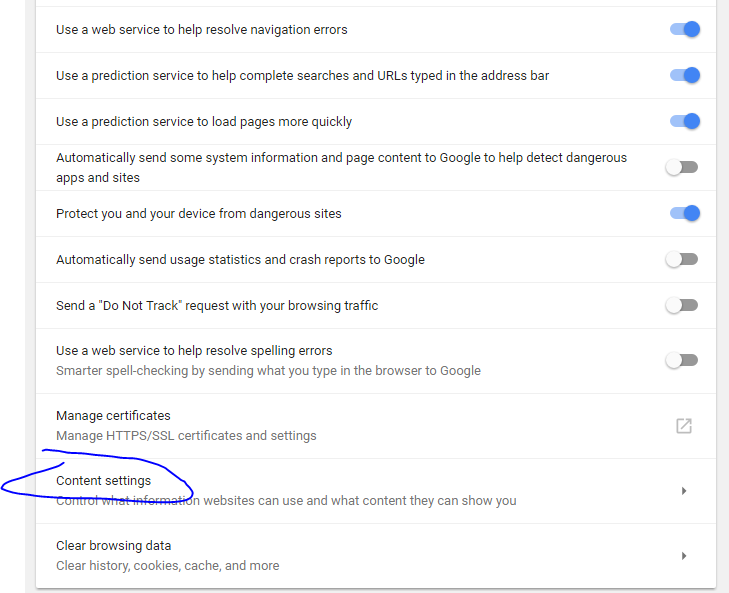
This setting screen is capture by version Version 59.0.3071.115 (Official Build) (64-bit)
Chrome is disabled flash on version 55.xxx, please make sure you got the latest version Chrome installed.


Goto Chrome Setting, on the bottom click "Advanced"


Under "Privacy and Security" click "Content Settings"


Under "Content Settings" click "Flash"

You can managed which site allow run flash

2017年6月20日 星期二

the operating system is not presently configured to run this application windows / 作業系統目前未設定執行此應用程式

When you try open any Microsoft Office product and pop-up the following screen "the operating system is not presently configured to run this application windows"


Please check did you installed Symantec Anti-Virus, recently i have implement Symantec Endpoint Protection Cloud on my client office, after install some user report the following error message and can't open any Word/excel/outlook.


If your problem is cause by Symantec Endpoint Protection Cloud, please try open it and update the definitions, after update it will back to normal.


Outlook Search not work and only work in Safe Mode

Key word : Outlook can't search / Outlook Search Not Work / Outlook search only work in Safe Mode

https://support.office.com/en-us/article/Outlook-known-issues-in-the-June-2017-security-updates-3f6dbffd-8505-492d-b19f-b3b89369ed9b?ui=en-US&rs=en-US&ad=US&fromAR=1

Suddenly your Microsoft Outlook can't search any e-mail or not match, this may be index problem,  if search is working on Outlook Safe Mode, that mean the Search Index got problem, because Safe Mode will not using Windows Search function.

Solution :
1. Claim down first, try search on internet, make sure this problem not affect by any Windows Update.  Microsoft always release windows update and it will kill something, if you can't find on internet try uninstall some recently windows update.
2. Try Rebuild Index
3. Disable Outlook Search Index (that mean not using Windows Search Services for Outlook search)
4. Disable Windows Search Services

Remark : Disable search index is temporary solution, does not solve the problem, but actually sometime we are no solution for this because Microsoft are suck!

How to access Outlook Safe Mode
 - Hold the Keyboard "CTRL" button then open the Outlook.


Try Rebuild Index
1. Click Search
2. Indexing Options
3. Advanced   "User require administrator right"
4. Click Rebuild
Remark : Typically you may need wait a whole day to finish the rebuild index, on step 2 indexing options have indexed status.


Below Action better is don't do that, final it will work, but for long terms you need enable it again, if your outlook have lot of e-mail, after disable the index and you need to enable again you will need to wait a long long long time for index rebuild


Disable Outlook Search Index

Click "File" > "Options"

Click "Search" then "Indexing Options"


Click Modify


Unclick "Microsoft Outlook" > "OK"


Disable Windows Search Services
 - Not recommended, because any search index on windows will disabled


Below Action will affect all Search function, include Windows Explorer search file

How to disable Windows Search services
1. Press "WIN" + "R" key, pop-up "Run" windows.


2. Type "services.msc" and enter

3. Locate "Windows Search", right click mouse and select properties
4. Startup Type change to "Disabled" and click "Stop"


5. Try close outlook and start again, the search function will work now!


How to Start Outlook with Safe Mode
Just hold the "CTRL" key to open the Outlook, it will pop-up windows ask you run Safe Mode or not

2017年5月16日 星期二

pfsense 502 bad gateway

If got problem on your pfsense firewall, please try using Putty connect to SSH, of course you should enabled SSH before.

After login run command    /etc/rc.php-fpm_restart